Bill Tracker Generator
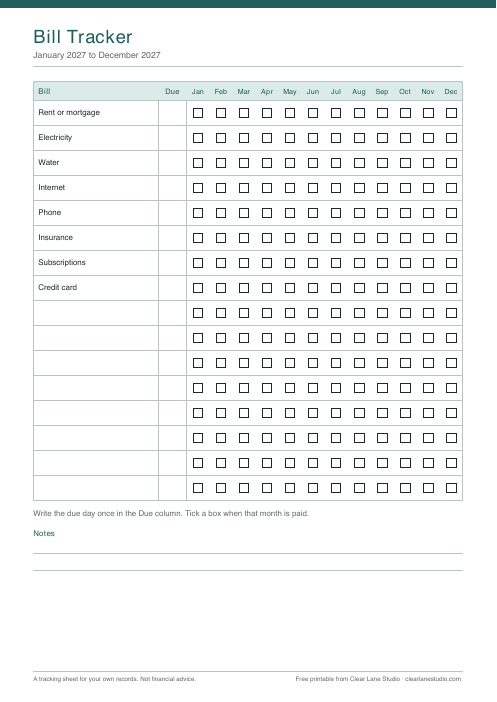
A blank bill tracker means writing the same names by hand every time you print one. Here you type your bills once and the page comes out ready: one row per bill, twelve months of tick boxes, and a column for the due day. It can start in any month, so you do not have to wait for January.
How to use it
- Type your bills, one per line. You can list up to 16.
- Choose the first month and its year. The page runs for twelve months from there.
- Download the PDF in A4 or US Letter and print it.
- Write each due day once, then tick a box when that month is paid.
Good to know
- Empty rows are left at the bottom for bills you remember later.
- The tracker records that a bill was paid, not how much. It is a record for you, not financial advice.
- Your list stays on your device. The PDF is made in your browser.
Questions
How many bills can I add?
Up to 16, with up to 26 characters each so every name fits on one line. A longer name is cut at the last space that fits, and lines after the sixteenth are left out. The page tells you when either happens.
Can the year run from April to March?
Yes. Pick any first month. The page always covers twelve months in a row and shows the right years in the heading.
What about bills that are not monthly?
Add them as a row and tick only the months when they are due. You can cross out the other boxes before you start.
Does it remind me to pay?
No. It is a printed page. It works best somewhere you look every week, such as the fridge or the inside of a cupboard door.
More free tools
- Debt Payoff Chart Generator
- No-Spend Month Calendar
- Phone Check-In Log
- Routine Tracker Generator
- Savings Challenge Generator
These printables are tracking sheets for your own plans. They are not financial advice and do not take your personal situation into account.